

Welcome to CoachCat! In 20 years of coaching WorldTour pros and masters athletes, I have watched the athletes who improve do the same few things. They pick a goal. They follow a plan built for that goal. They give every ride a purpose, get honest feedback on it, recover, and adjust when life gets in the way.
CoachCat does every one of those things with you, every day. This guide walks through all eight steps in the order you will meet them. You do not need to memorize any of it. Do the checklist below, go ride, and come back here whenever you have a question.
Tell everything, ask anything.
That is the one rule. CoachCat coaches you best when it knows what is going on, exactly like a human coach. Your goals, your schedule, how you slept, the knee that is acting up: tell it all, in your own words.
Coach Frank
Your first week checklist
0 of 10 doneTick them off as you go. Your progress is saved in this browser.
Set up your account and devices
CoachCat runs on your phone and on desktop at app.fascat.ai, with one account and one calendar across both. The desktop calendar is great for planning your week. Your phone is where you check recovery in the morning and chat with CoachCat on the go.
Download it from the App Store or Google Play.
Connect your bike computer first
Your bike computer is the most important connection in the app. It brings every ride into CoachCat for analysis, and it puts your workouts on your handlebars. Connect Garmin, Wahoo or Hammerhead from your profile and you are good to go. Start here, not with Strava.
Add a wearable for recovery
A wearable is optional. Your power data alone drives your Recovery score. A wearable adds sleep and heart rate variability (HRV), which makes the picture of how recovered you are much more complete.
| Platform | Sleep and HRV | Ride data | Send workouts to |
|---|---|---|---|
| Garmin | Yes, on watches that record sleep and HRV | Yes | Yes |
| Wahoo | Yes | Yes | |
| Hammerhead | Yes | Yes | |
| Coros | Yes | Not yet | |
| Apple Watch | Yes | In the works | |
| Whoop | Yes | ||
| Oura | Yes | ||
| Fitbit | Yes | ||
| Eight Sleep | Yes | ||
| Zwift | Yes | ||
| Rouvy | Yes |
Riding indoors on Zwift or Rouvy
Connect Zwift or Rouvy and your CoachCat workouts show up in your workout list, ready to ride. Step by step instructions: workouts on Zwift and workouts on Rouvy.
Set your training zones
You only need one number to start: your FTP (functional threshold power), or your threshold heart rate if you train by heart rate. Go to Profile, then Training Zones, enter it at the top, and CoachCat calculates every zone for you. We use the standard 7 power zones plus Sweet Spot, which sits across the top of Zone 3 and the bottom of Zone 4.
Do not know your FTP? No problem. Many FasCat plans begin with a 20 minute field test. Warm up, ride as steady and hard as you can for 20 minutes, and 92.5% of your average power is your FTP. After that, Auto FTP detection watches your rides and tells you when you have gotten stronger.
Our plans are zone based, so they work with power, heart rate, or perceived exertion and a timer. CoachCat even calculates a heart rate based training stress score for rides without power.
Message us from the chat in the upper right of the app. A FasCat coach will figure out what is wrong and get your data flowing.
Read more: Setting up training zones, FTP testing and Auto FTP detection.
Pick your goal
Every good plan starts at the finish line and works backward. Tell CoachCat what you are training for and when: a gravel race, a gran fondo, your first crit, a century, or simply the first fast group ride of spring. Ambitious enough to get you out the door, realistic enough to reach.
Build around your A events only
An A event is the one you want to peak for. Give CoachCat the name and the date of your A events only. If you list every race on your calendar, CoachCat will try to peak you for all of them. Once your plan is built, add your B and C races one at a time and CoachCat will fit them in.
Make it stick with "Remember this"
CoachCat remembers your goals, injuries and preferences like a real coach. To be sure it keeps something across every conversation, end your message with "Remember this."
No race on the calendar?
Pick a date anyway, like the first group ride of the season, or simply train to get faster all year. The most successful cyclists train year round.
Try asking CoachCat
My A race is [event name] on [date]. Remember this.
I don't have a race. I want to be strong for the first fast group ride in April. Remember this.
What do you remember about me?
Build your plan
The Custom Plan Builder asks a few questions, then does what a coach does. It strings our training plans together as phases so you arrive at your goal fit and fresh. Every plan in the library was designed by me and the FasCat coaches, with age appropriate intervals and training hours built in. Build your plan here first, then use the chat to fine tune it.
Pick your level
Each level is built with age appropriate intervals and training hours, so pick the one that matches your age and the time you have.
Basic
4 to 8 hours a week
Ages 60/70+
About 1 hour rides on work days. Very Masters friendly.
Intermediate
8 to 12 hours a week
Ages 40/50/60+
About 1.5 hour rides on work days. Masters friendly if you recover well.
Advanced
The most volume
Ages 20/30+, if you have the time
Rides of 2 hours or more on work days, for athletes with the time and recovery for it.
More volume usually means faster improvement, as long as you recover from it. Your Recovery score will tell you if you are. You can switch levels any time: go to Profile, then Manage Custom Plan, remove the plan, and apply the other level from the library.
Tell CoachCat when you can ride
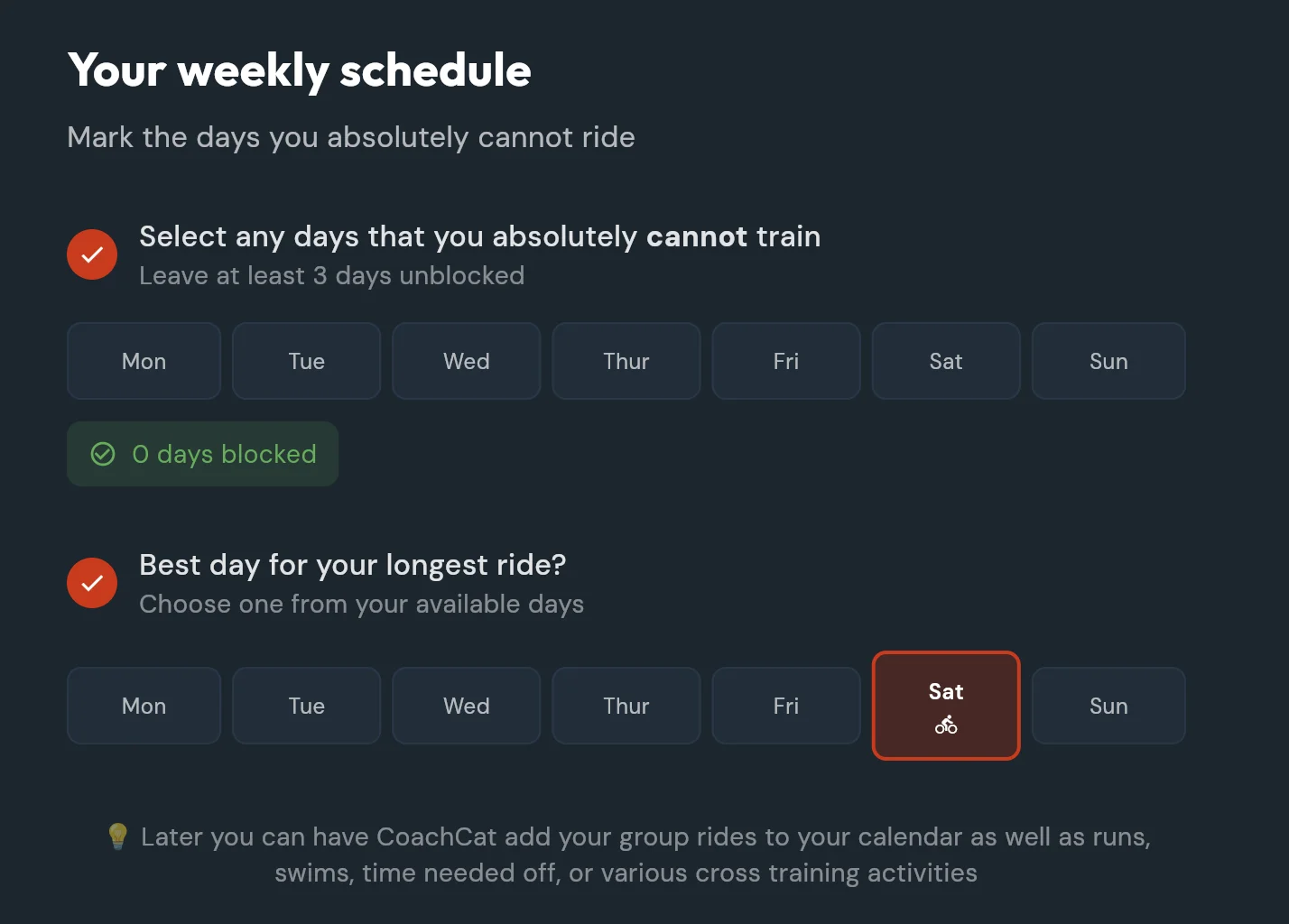
Mark any days you absolutely cannot ride, leaving at least 3 days open, then choose the best day for your longest ride. Plans put the ride durations for your level on the right days. If your week changes later, just tell CoachCat.
What to expect on your calendar
- Many plans begin and end with an FTP test.
- Friday is always a rest day, except during weight lifting phases, with a Recovery Day card for Foundations, REVO or Yoga for Cyclists.
- If your plan starts next Monday, fill the days in between by asking CoachCat for a workout for today.
Add strength
Lifting raises your FTP. Choose the 10 week weight lifting plan from the training library, or add strength maintenance workouts from the workout library. Weight lifting for cycling explains the whole program.
Explore the library
Your membership includes over 100 training plans and over 300 workouts, with unlimited use, plus the Winning in the Kitchen meal plans and recipes. Put any workout or recipe on your calendar with a tap.
Every trial and membership includes a 30 minute call with a FasCat coach. Bring your goals and your schedule and we will help you set up a year round approach. Schedule your call
Try asking CoachCat
I have about 6 hours a week to train. Which plan level fits me?
Give me a workout for today until my plan starts on Monday.
Add a strength maintenance workout on Tuesdays.
Watch and read: Build a custom cycling training plan in 5 questions, The annual training plan, all 7 phases explained, The 30 week off season.
Ride the workout
Most days, following your plan takes three steps:
- Open today's workout in CoachCat.
- Send it to your Garmin, Wahoo or Hammerhead, or to Zwift or Rouvy.
- Pedal. Your device shows your power and counts down each interval for you.
The one skill that matters: hold your zone
Every workout is built from time in power zones. Pedal hard enough to get into the range, then hold it for the length of the interval. Below the range, pedal a little harder. Above it, ease off a touch. When the interval ends, spin easy in Zone 1 or 2, then go again. A 3 or 10 second power average on your head unit makes the number much easier to hold.
Say today is 3 x 10 minutes of Sweet Spot at 240 to 276 watts with 5 minutes easy between. Warm up in Zone 2, start the first interval on an easy time to track like the 30 minute mark, round your target to 250 to 275 so it is easy to remember mid effort, and hold it until 40 minutes. Spin easy until 45, then repeat twice.
Relax about the details that do not matter
- Warm up and cool down durations are guidelines. Whether it takes 16 or 21 minutes to get warm does not matter.
- For Zone 2 rides and group rides, a few minutes over or under is fine.
- OTS targets are a range. Plus or minus 5 to 10% is right on target.
- One great workout a day beats two rides stitched together to chase a number. Do not split the day's workout in two.
Fuel the ride with FuelTrix
CoachCat calculates the grams of carbohydrate per hour for every workout on your calendar, from the duration and intensity you already have planned, then turns that number into bottles and gels. Underfueling is the most common mistake we see, so check it before you roll out.
Try asking CoachCat
How many carbs should I eat on today's ride?
I'm riding outside today. How do I do these intervals on the road?
Explain today's workout like I'm new to intervals.
Read more: How to follow your CoachCat workouts, The complete guide to Sweet Spot Training, FuelTrix: how many carbs to eat.
Read your ride analysis
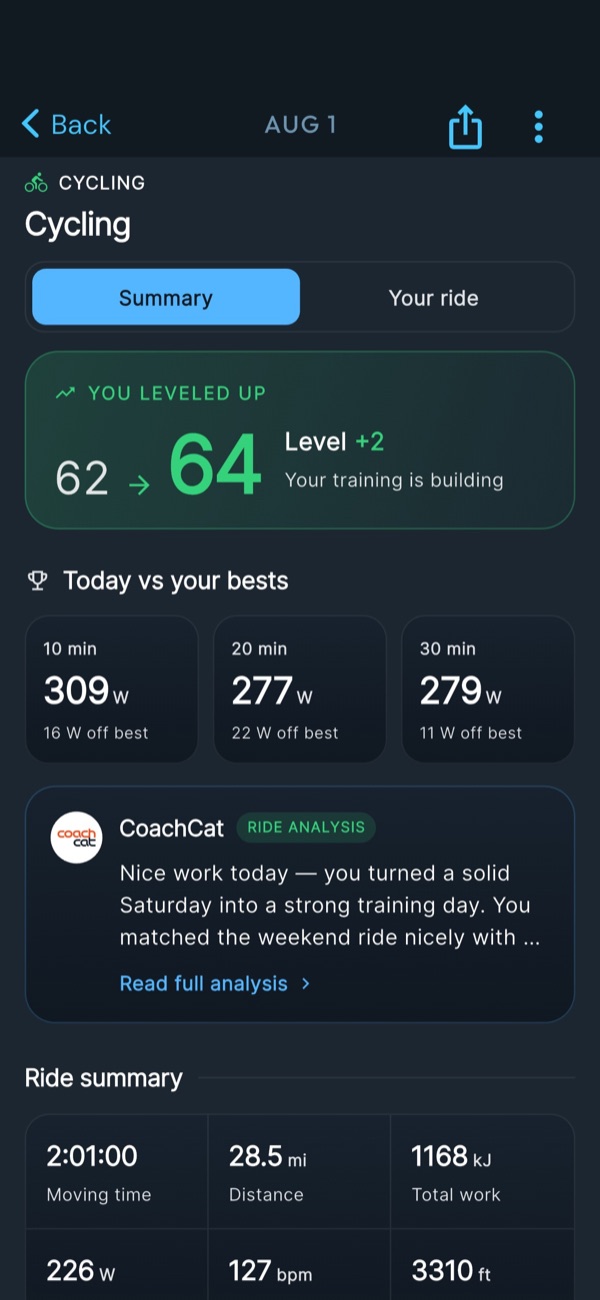
Save the ride on your bike computer and CoachCat analyzes it the moment it uploads. Here is what you will see, top to bottom:
- Level up. How many points the session was worth and which way your training is trending.
- Today vs your bests. Your 10, 20 and 30 minute power from this ride next to your all time bests, with the gap in watts.
- The coach's read. A written analysis of what the ride was, whether you executed it, and what it sets up next.
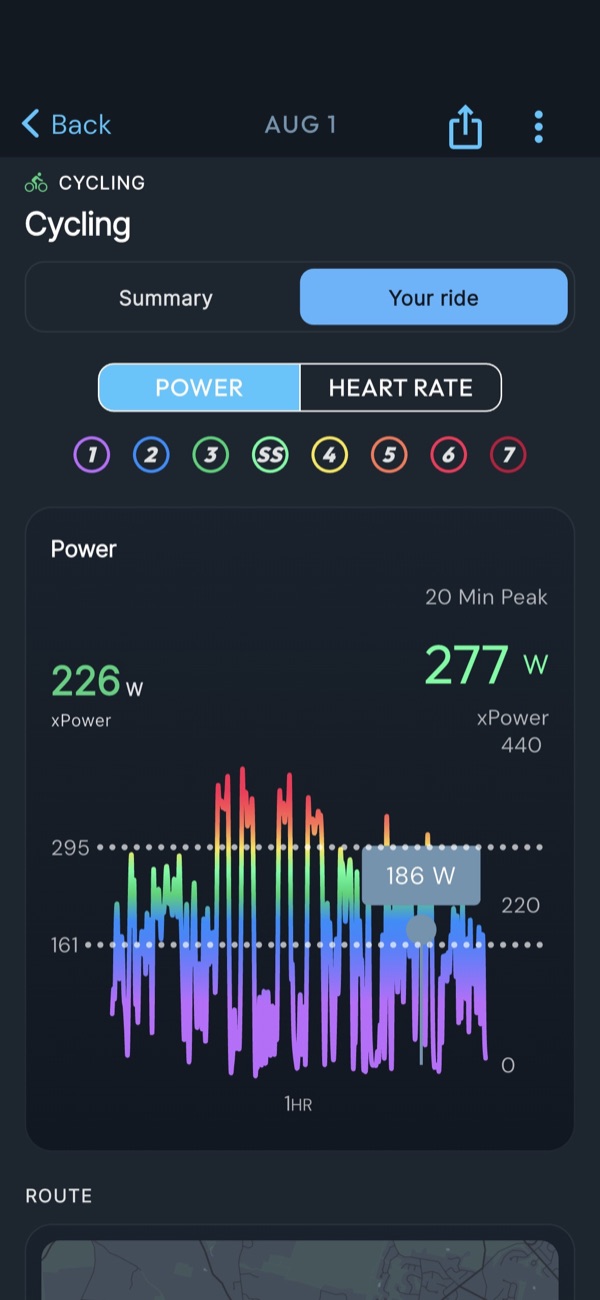
- Your ride. Flip the toggle for the full file: power and heart rate, your power trace colored by zone with Sweet Spot as its own band, xPower, 20 minute peak, elevation, kilojoules and your route.
Auto FTP detection
You do not have to retest every month to know you are stronger. When a workout, race or hard group ride shows a higher FTP, CoachCat detects it and lets you know.
Ask for the truth
The analysis is where the conversation starts, not where it ends. Ask follow up questions. If you want it straight, ask for more critical feedback. Athletes use that one more than any other.
Try asking CoachCat
Give me more critical feedback on today's ride.
Did I execute today's intervals the way they were written?
What did that ride set up for tomorrow?
Read more: Instant workout analysis, Auto FTP detection, Tour of the CoachCat 4.0 screens.
Recover
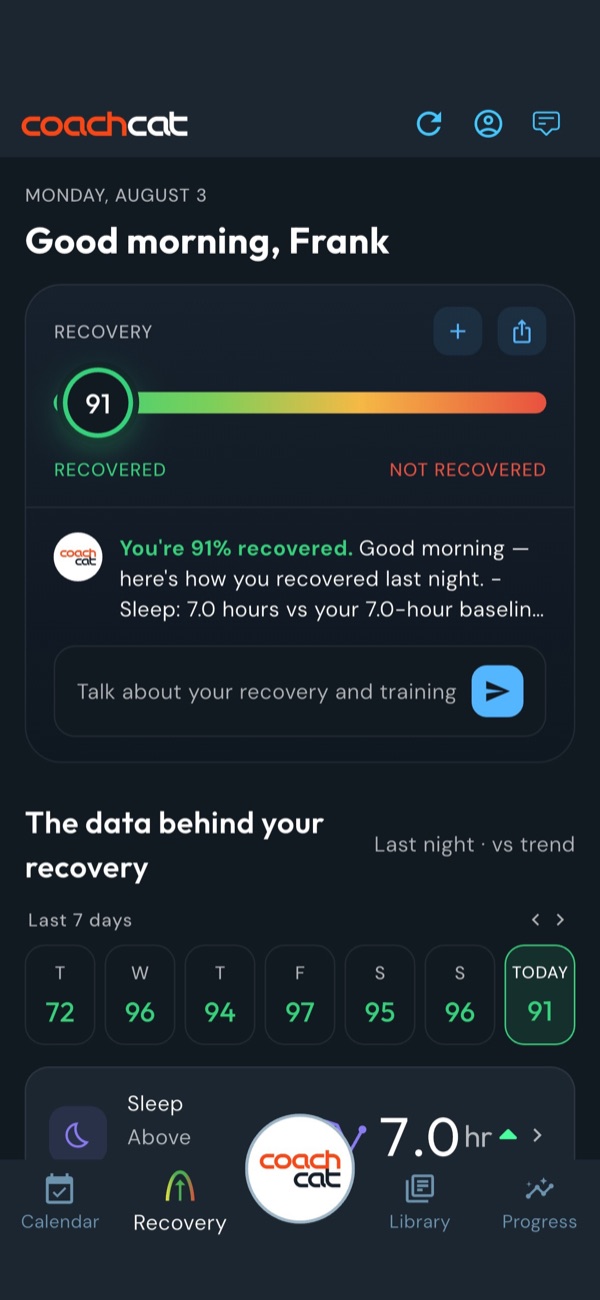
You get faster while you recover, not while you ride. Open the Recovery screen each morning and you get one number, a percentage on a scale from recovered to not recovered. It reads your sleep, your HRV and the training stress from the last few days.
Underneath, the data behind your recovery shows which inputs moved the score and in which direction versus your own baseline. The 7 day trend puts last night in context. Then CoachCat checks your score against what is on the calendar. Fresh with intervals planned? Go execute. Wrecked with a hard day queued up? CoachCat opens the conversation about changing it.
Rest days are training days
Taking your planned rest day counts toward your streak. So does the 12 minute Foundations routine on a recovery day. Being in the red after a hard block can be part of the plan. Staying there is when recovery becomes the workout.
Try asking CoachCat
I slept badly. Should I still do today's intervals?
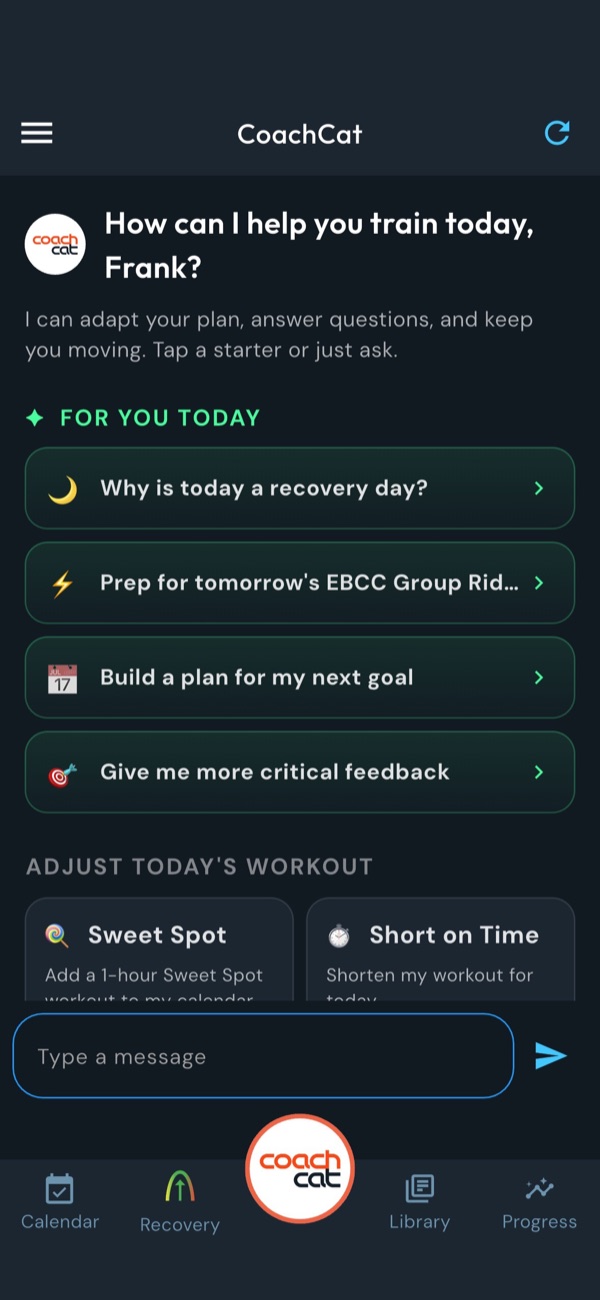
Why is today a recovery day?
What should I eat in the 30 minutes after a hard workout?
Read more: 9 ways to increase your HRV, Winning in the Kitchen.
Adjust when life happens
Work, weather, travel and family will get in the way. That is exactly what CoachCat is for. Tell it what changed and it revises your plan in seconds, as many times as you need.
Missed a workout
CoachCat rebuilds the rest of your week so you stay on track, without piling missed work onto tired legs. No guilt required.
Say I missed yesterday's workout. Revise my week.
Short on time
It rewrites today's workout to fit the time you have and keeps the most important work.
Say I only have 1 hour today. Shorten my workout.
Sick or injured
Tell it right away. It clears your calendar and brings you back the right way, with day by day guidance on what to do and what not to do.
Say I have a head cold and a sore throat.
Traveling
Tell it the dates and whether you will have a bike, a hotel gym or nothing at all.
Say I'm traveling for work Tuesday through Thursday with no bike.
A race or group ride
Give it the date, how long, and how hard. Then ask what to do the day before and it adds an openers workout.
Say Add a 3 hour gravel race on Saturday. What should I do the day before?
Feeling great
Extra easy Zone 2 after your intervals is fine as long as it does not cost you tomorrow. Or ask for more.
Say I feel great today. Add an hour of Sweet Spot.
Vacation or cross training
Add days off, running, skiing, yoga or anything else to your calendar the same way.
Say I'm skiing all next week. Adjust my plan.
You can also make changes by hand. Drag a workout to a new day, or use the pencil icon to move, copy, edit or delete it. Want a workout that is not in the library? Describe it and CoachCat builds it on your calendar.
Read more: 12 ways CoachCat coaches you, What to do if you feel sick or get injured, Creating custom workouts.
Track your progress
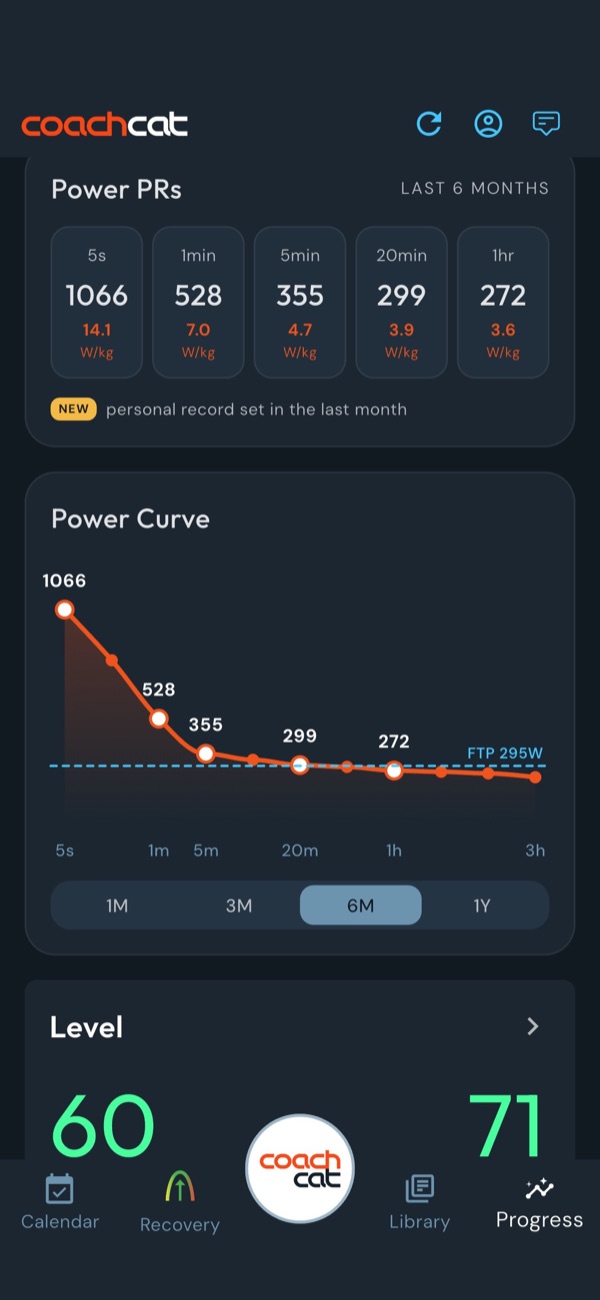
Fitness gains are slow and hard to feel from inside the week, which is why the Progress tab exists. Your Power PRs sit at the top: your best 5 seconds, 1 minute, 5 minutes, 20 minutes and 1 hour, in watts and in watts per kilogram, with a NEW badge on anything set in the last month. Below that, your power curve plots your whole engine against your FTP over 1, 3, 6 or 12 months so you can watch it lift.
The five numbers that matter
Recovery
What should I do today?
Sleep, HRV and recent training stress in one percentage.
Level
How much fitness am I building?
A rolling 42 day average of your daily OTS. Ride consistently and it climbs.
Power PRs
Am I getting faster?
Your best efforts from 5 seconds to 1 hour, plus your FTP.
Streak
Am I consistent?
Days in a row following your plan, rest days included.
OTS
How hard was that ride?
Optimized Training Stress. Accounts for fatigue that builds during a ride and for coasting.
Turn the calendar green
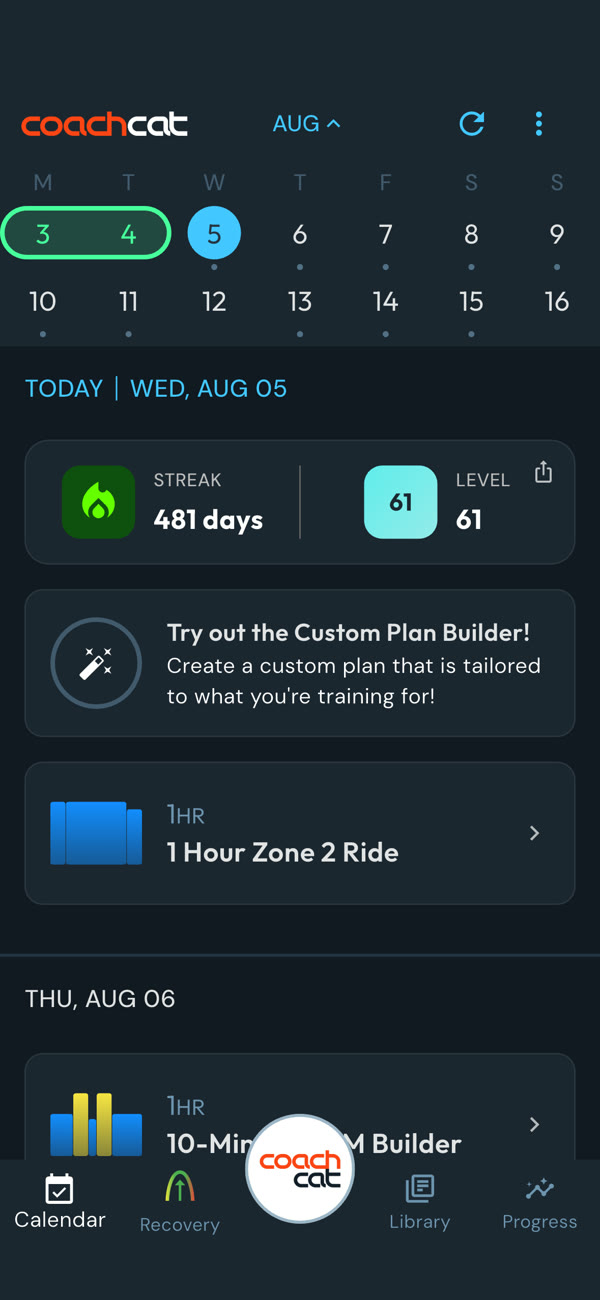
When you follow the plan for the day, it turns green on your calendar. Green days stack into weeks, and green weeks stack into the improvement you signed up for. We call it FtFP: follow the plan.
Follow the plan for six weeks and you will be faster. See how the guarantee works.
Try asking CoachCat
Am I improving? Compare my last 6 weeks to the 6 weeks before.
Which of my power PRs are new this month?
Build a plan for my next goal. My block ends soon.
Read more: 5 training metrics that matter most, What is Level?, What improvement really means.
Get help
Ask CoachCat first. It answers most training questions instantly, day or night, and you can ask as many as you like without ever being annoying.
Want a human second opinion? Real FasCat coaches are behind every membership. Tap the help icon in the upper right of the app to message us. We reply promptly Monday to Friday, 7am to 6pm Mountain time. You can also call 720.273.1675.
Want a coach managing your plan? Our 1:1 coaching pairs you with a FasCat coach who designs and revises everything with you.
Have an idea for the app? Make a feature request. We read every one.
Quick how to
The fastest answer to the most common questions. Prefer to watch? Every screen is shown in our How To within CoachCat videos.
Connect your Garmin, Wahoo or Hammerhead
In the app, go to your profile and connect your bike computer account. Every ride will upload for analysis, and your workouts can be sent to your handlebars.
Connect your wearable for sleep and HRV
In your profile, connect Garmin, Apple Watch, Whoop, Oura, Fitbit or Eight Sleep. Your Recovery score picks up sleep and HRV the next morning.
Set your FTP and training zones
Go to Profile, then Training Zones. Enter your FTP and threshold heart rate at the top and CoachCat fills in every zone. Setting up training zones
Build a custom plan
Open the Custom Plan Builder, tell it your goal and date, pick your level, mark the days you cannot ride and choose your long ride day. Build a plan in 5 questions
Switch plan levels
Go to Profile, then Manage Custom Plan. Remove the plan, then apply the other level from the library.
Send a workout to your bike computer
Open the workout on your calendar and send it to your Garmin, Wahoo or Hammerhead. Sync your device and it prompts you through each interval. How to follow your workouts
Ride your workout on Zwift or Rouvy
Connect Zwift or Rouvy once. Your CoachCat workouts then show up in your workout list, ready to ride. Zwift steps
Move, copy or delete a workout
Drag a workout to a new day, or tap the pencil icon to move, copy, edit or delete it. Or just ask CoachCat to do it.
Add a race, group ride or day off
Tell CoachCat the date, how long and how hard. Say “Add a 3 hour gravel race on Saturday” and it lands on your calendar. 12 ways CoachCat coaches you
Create a custom workout
Describe the workout you want in the chat, like “Give me 1 hour of Sweet Spot with 3 x 12 minute intervals.” CoachCat builds it on your calendar. Creating custom workouts
Add a workout or recipe from the library
Open the library, pick a workout, plan or recipe, and add it to the day you want.
Make CoachCat remember something
End your message with “Remember this.” Ask “What do you remember about me?” any time to check.
Message a FasCat coach
Tap the help icon in the upper right of the app. We reply Monday to Friday, 7am to 6pm Mountain time.
Book your free coaching call
Every trial and membership includes a 30 minute call with a FasCat coach. Schedule your call
Request a feature
Tell us what you want CoachCat to do next. We read every request. Feature requests
Nothing matches. Ask CoachCat, or tap the help icon to message a coach.
CoachCat from A to Z
Every term you will run into in the app, in plain language.
- A event
- The goal you want to peak for. Build your plan around A events only.
- Advanced
- The plan level with the most volume, with rides of 2 hours or more on work days.
- Auto FTP detection
- CoachCat spots a higher FTP in your rides and races and lets you know, so you do not have to test every month.
- B and C races
- Events you want to ride well but not peak for. Add them after your plan is built.
- Basic
- The plan level for 4 to 8 hours a week. Very Masters friendly.
- Coaching call
- The free 30 minute call with a FasCat coach included with every trial and membership.
- Conversation starters
- Suggested questions in the app that change daily based on your data and your calendar. Tap one to ask it.
- Custom Plan Builder
- Asks about your goal, level and schedule, then puts a coach designed plan on your calendar.
- Desktop app
- CoachCat in your browser at app.fascat.ai, with the same account and calendar as your phone.
- Foundations
- Our 12 minute core and mobility routine for recovery days. It counts toward your streak.
- FTP
- Functional threshold power: the most watts you can hold for about an hour. Every zone is calculated from it.
- FtFP
- Follow the plan. The athletes who FtFP improve and hit their goals.
- FuelTrix
- Grams of carbohydrate per hour for every workout, turned into bottles and gels.
- HRV
- Heart rate variability, measured by your wearable overnight. One of the inputs to your Recovery score.
- Heart rate training
- Training by threshold heart rate instead of power. Every plan supports it.
- Intermediate
- The plan level for 8 to 12 hours a week. Masters friendly if you recover well.
- Intervals
- Timed efforts in a specific zone with easy riding in between. The work that makes you faster.
- Kilojoules
- The total work you did on a ride. Handy for fueling and for comparing long rides.
- Level
- Your recent fitness: a rolling 42 day average of your daily OTS.
- Library
- Over 100 training plans, over 300 workouts, meal plans and recipes, all included.
- Masters friendly
- Plans with the recovery and age appropriate intensity that riders over 40 need.
- Meal plans
- The Winning in the Kitchen Meal Plan and Weight Loss Meal Plan, in your library.
- Openers
- A short workout the day before a race to wake your legs up. Ask CoachCat what to do the day before.
- OTS
- Optimized Training Stress: how hard a ride was on your body, counting fatigue that builds during the ride and coasting.
- Plan revision
- Any change CoachCat makes to your plan when life happens. Unlimited.
- Power PRs
- Your best 5 second, 1 minute, 5 minute, 20 minute and 1 hour power, on the Progress tab.
- Progress tab
- Where your Power PRs and power curve answer the question: am I improving?
- Recovery score
- One percentage from recovered to not recovered, from your sleep, HRV and recent training.
- Remember this
- Type it after anything you want CoachCat to keep across every conversation.
- Rest day
- Fridays on FasCat plans, except during weight lifting phases. Resting is part of the plan and keeps your streak alive.
- Rouvy
- Indoor training app. Your CoachCat workouts show up there, ready to ride.
- Send to device
- Puts the workout on your Garmin, Wahoo or Hammerhead so it prompts you through each interval.
- Streak
- How many days in a row you have followed your plan, rest days included.
- Sweet Spot
- The zone across the top of Zone 3 and the bottom of Zone 4. The most bang for your training buck, and the foundation of how FasCat builds fitness.
- Taper
- Reducing training before an event so you arrive fresh. See the 2 Week Taper plan in the library.
- Training zones
- The power or heart rate ranges each workout is written in. Set them in Profile, Training Zones.
- Watts per kilogram
- Your power divided by your body weight. The number that decides who wins on climbs.
- Winning in the Kitchen
- FasCat's approach to performance nutrition, with meal plans and recipes in your library.
- xPower
- A smoothed average power that reflects what a ride really cost you, better than plain average power on rides full of surges.
- Year round training
- Off season, race season and everything in between. The most successful cyclists train year round.
- Zone 2
- Endurance pace. Conversational, steady, and the base everything else is built on.
- Zwift
- Indoor training app. Your CoachCat workouts show up there, ready to ride.
No terms match. Try asking CoachCat instead.
Want every term? See the full FasCat training glossary.
Frequently asked questions
The questions new athletes ask us most. The full list lives on our FAQ page.
Is coaching included?
Yes. You get a 30 minute call with a FasCat coach when you start a trial or membership, plus unlimited messaging with the FasCat coaches inside the app. How coaching works with your membership.
Do I need a power meter?
No. You can train by heart rate or by perceived exertion. Our plans are zone based, so they work with power, heart rate, or just a timer.
Do I need a wearable?
No. Your power data alone drives your Recovery score. A wearable adds sleep and HRV for a more complete picture.
Does CoachCat work with Apple Watch?
Yes, for sleep and HRV. Recording rides on Apple Watch and bringing that activity data in is not available yet. We are working on it.
Does CoachCat sync with TrainingPeaks?
No. CoachCat replaces it. Your plan, workouts, analysis and coaching all live in one app, including the desktop version, and your workouts go straight to Zwift, Rouvy and your bike computer.
Which plan should I do?
Let the Custom Plan Builder decide. Tell it what you are training for and when, and it designs a series of phases around your goal the way a coach would.
Can I buy a single training plan like you used to sell them?
No. We moved to a membership so you can pair multiple plans together as phases of training, with coaching included, and so we can keep improving a complete training solution.
What if my data does not upload?
Message us from the chat in the upper right of the app. We will diagnose what is wrong and get your rides uploaded.
How do I reach a FasCat coach, and when do you reply?
Tap the help icon in the upper right of the app. The FasCat coaches reply promptly during business hours, Monday to Friday, 7am to 6pm Mountain time.
Videos and further reading
How To within CoachCat
11 short videos that walk you through the app screen by screen. Watch one before you tackle each step in this guide.
Watch the playlistUsing the app
Training
That's everything. Go ride.
Open today's workout, send it to your bike computer, and tell CoachCat how it went. We are here every step of the way.
Work hard. Ride fast. Have fun. FtFP.